


Checking your JAMB result in 2025 is as easy as making a phone call or sending an SMS with your phone! In this article, I will show you how to check your JAMB UTME result with your mobile or smartphone. Let’s delve into the process involved in checking your UTME result at once, adorable aspirants.
First, first, first, make sure you have the sim card which you used during the JAMB exam registration.
Now open the SMS app on your phone.
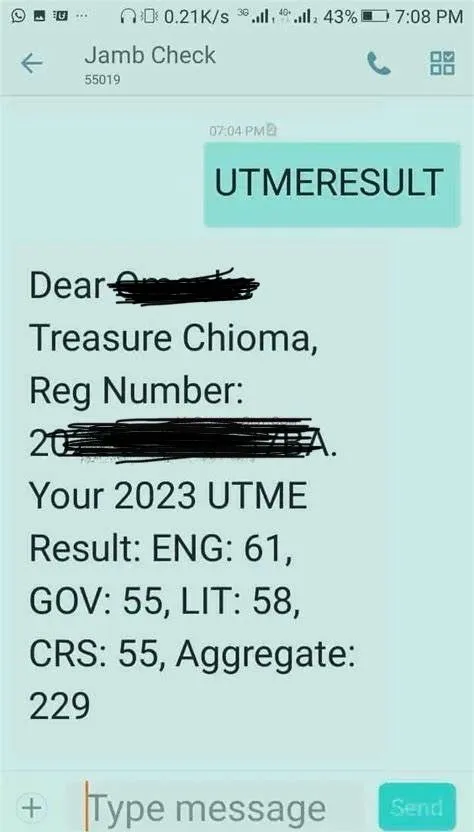
Next on, using the SMS app on your phone, type UTMERESULT and send it to 55019.
Make sure you type the ‘UTMERESULT’ in capital letters. Caplock.
You will be charged 50NGN by your network provider for the message sent. So confirm that you have at least 50 Naira on your airtime balance before you go ahead to click send. This way you are sure that the request for your result will be delivered seamlessly.
Once your message has been successfully delivered to JAMB, you will receive an SMS shortly. This new message is a reply from JAMB containing your UTME result details.
The SMS which you have received will show you your JAMB exam score in each of your four subject combinations. And your aggregate will be included as well.
You can now go ahead and print out your original JAMB result slip at this point.
If you are having troubles sending the ‘UTMERESULT’ via SMS to 55019, try sending it to 66019. That is the alternative code for checking the 2025 JAMB exam result.
Consequently, I will show you how to print your original result slip, check admission status, accept admission, and other things that concern your preparatory steps to beginning your journey into higher institutes of learning.
Warm welcome, my adorable aspirants. See you soonest!